 forkcast
My take on meal planning and calorie tracking. Would you want it hosted?
forkcast is my take on meal planning and meal prep, ad hoc calorie tracking and lo-fi recipe storage. It helps me stay on the right trajectory to achieve my nutrition, weight and fitness goals.
Since my view on low-friction meal planning and calorie tracking might not be unique to me, others might also like the decisions I took to make this topic less annoying. If people who can self-host it find it useful, it might be worth making it available as a hosted version for people who are less tech-savvy.
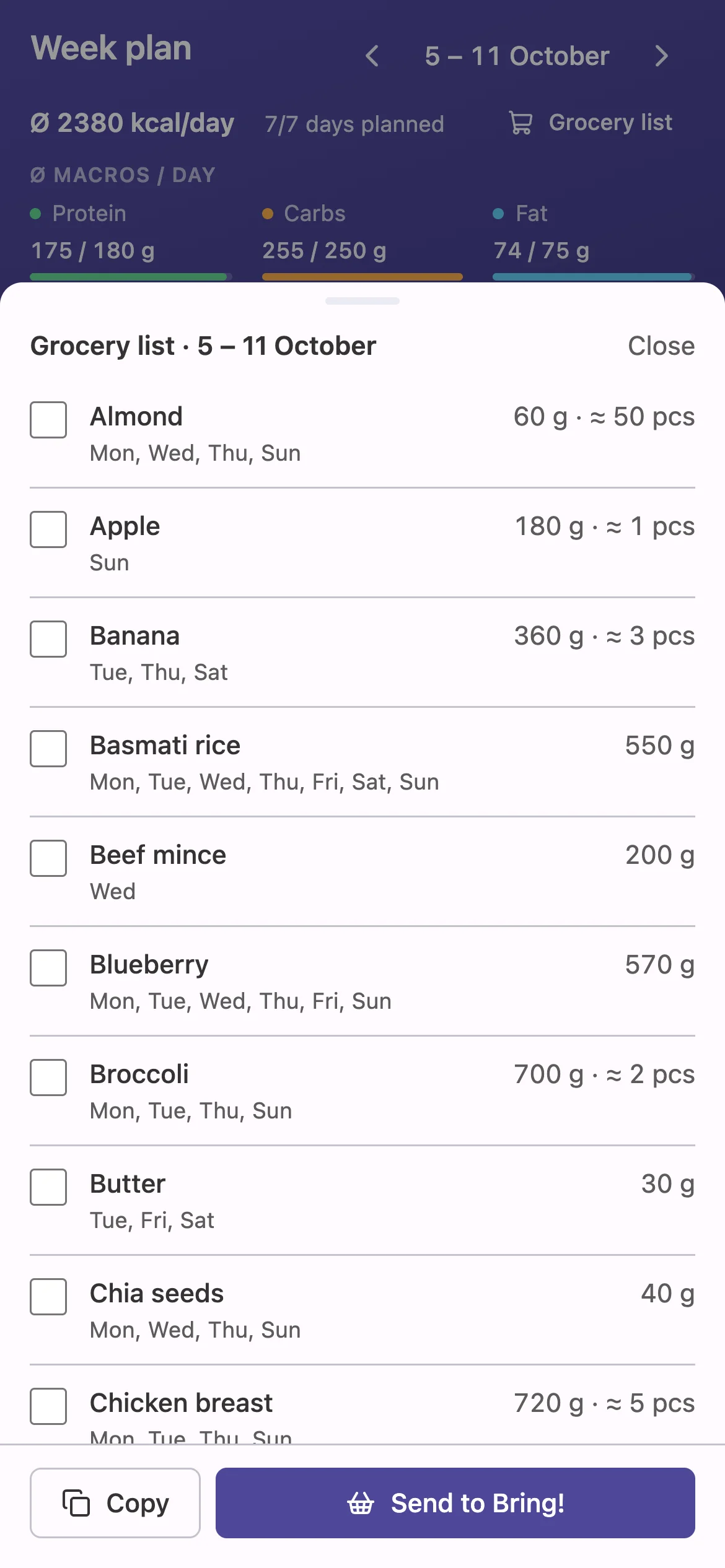
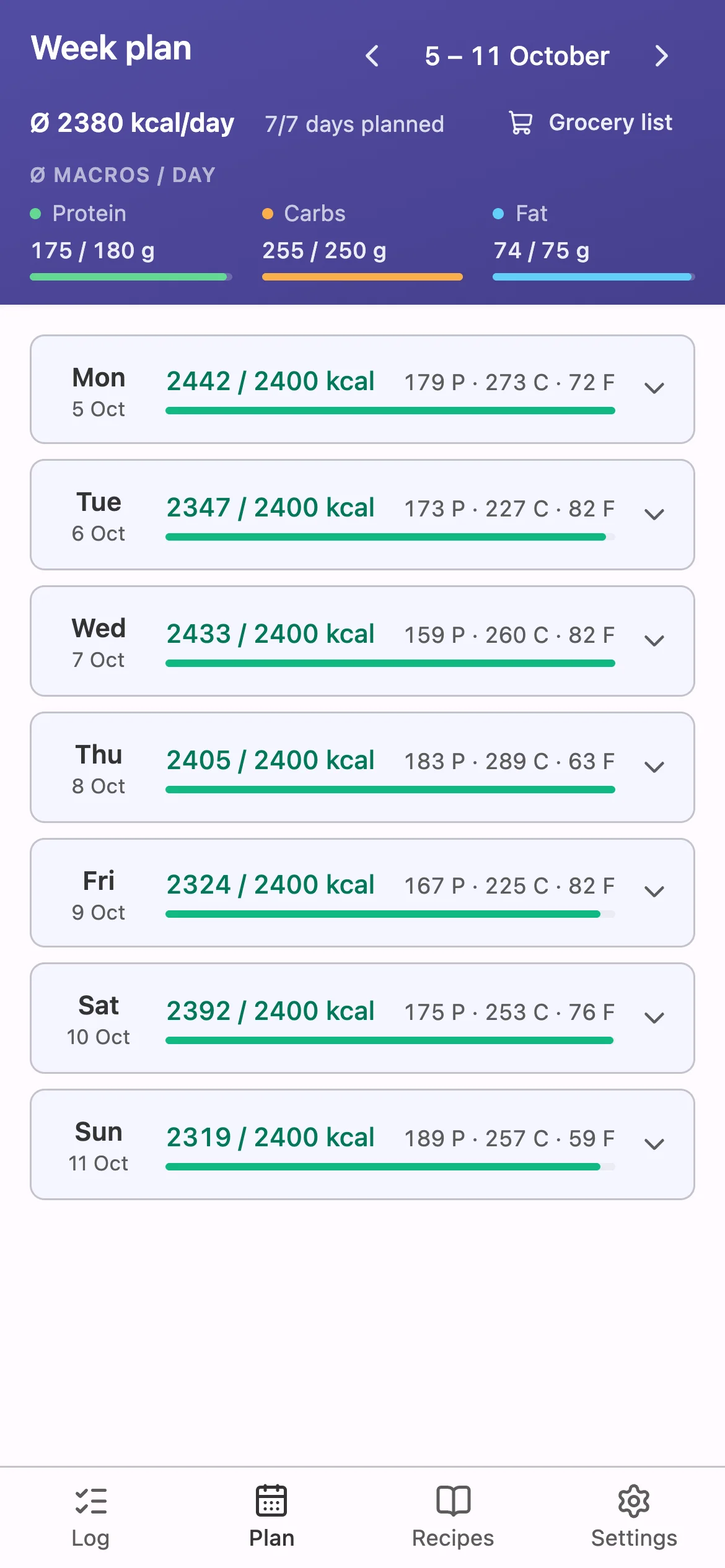
Why I frankensteined yazio, fddb, MyFitnessPal and Excel together
The need for planning, prepping and tracking my meals came from me doing a 90-day fitness challenge to lose weight and get fitter. During the challenge, they suggested using these apps for meal planning to make sure to hit calorie and macro goals, and to not spread thinking about what to eat across days, but to prepare it once and then benefit from the plan for the whole week.
I am a father of two, with a full-time job, so I was happy that there seemed to be tools to support me during that phase of 90 days, and of course afterwards, since one goal of the 90-day challenge was to basically set the trajectory for the rest of your life, which is also quite a bold claim if you ask me.
What annoyed me the most was that they are not built around planning a week ahead, but rather around tracking what you're currently eating or what you plan to eat on a certain day. The next major issue that annoyed me was how they deal with recipes and meals and the tracking of them. Mostly a recipe is tracked as one entity and not as the ingredients that make the recipe, which often makes switching ingredients very hard, because you always have to edit the recipe and you can't switch ingredients ad hoc, maybe as you are cooking in the moment.
Breakfast420 kcal
Overnight oats1 serving420
Lunch640 kcal
Chicken curry1 serving · ingredients hidden640
Less rice today? Edit the recipe first.
Dinner
+ Add food
Planning the week? One day at a time.
Another thing was the inconsistency between the mobile and desktop UI, if they had one. Some features of some apps didn't exist in the mobile UI but did on desktop, which made no sense at all. Sometimes it was the other way around. So getting used to two different interfaces and two different sets of features was just annoying as well. And of course, a lot of them had a lot of features that I simply don't need, but that would get in my way during the day, because they use space on the UI that could simply be used by something else.
Phone
Desktop
I had the paid versions of some of these apps, and even they didn't unlock the features that I would have found useful.
Your planPremium, active
Meal plannerOnly in Premium+
Upgrade
The Excel sheet, on the other hand, was as low-key as I could go from a technical standpoint, because it was able to do the math behind calories and such. But recipe tracking or using it as a cooking companion was of course not nice, and of course the ad hoc tracking was simply impossible, because there was no nice mobile UI, no barcode scanner, and so on and so forth.
| Mon | Tue | Wed | kcal | |
|---|---|---|---|---|
| Breakfast | Oats | Oats | Skyr | 1,420 |
| Lunch | Bowl | Dal | Bowl | 2,310 |
| Dinner | Salmon | ? | Leftovers | #REF! |
| Protein | 171 | — | 158 |
My week with it
Usually I start by planning the week ahead on Thursday or Friday, so I can do the groceries on Saturday. Meal prep for the week ahead is done on Sunday. I most likely prep Monday to Wednesday, and on Wednesday I prep until Friday again. Depending on what I'm gonna cook, it varies from week to week. When planning, I start with breakfasts and then lunch.
- Protein
- Carbs
- Fat
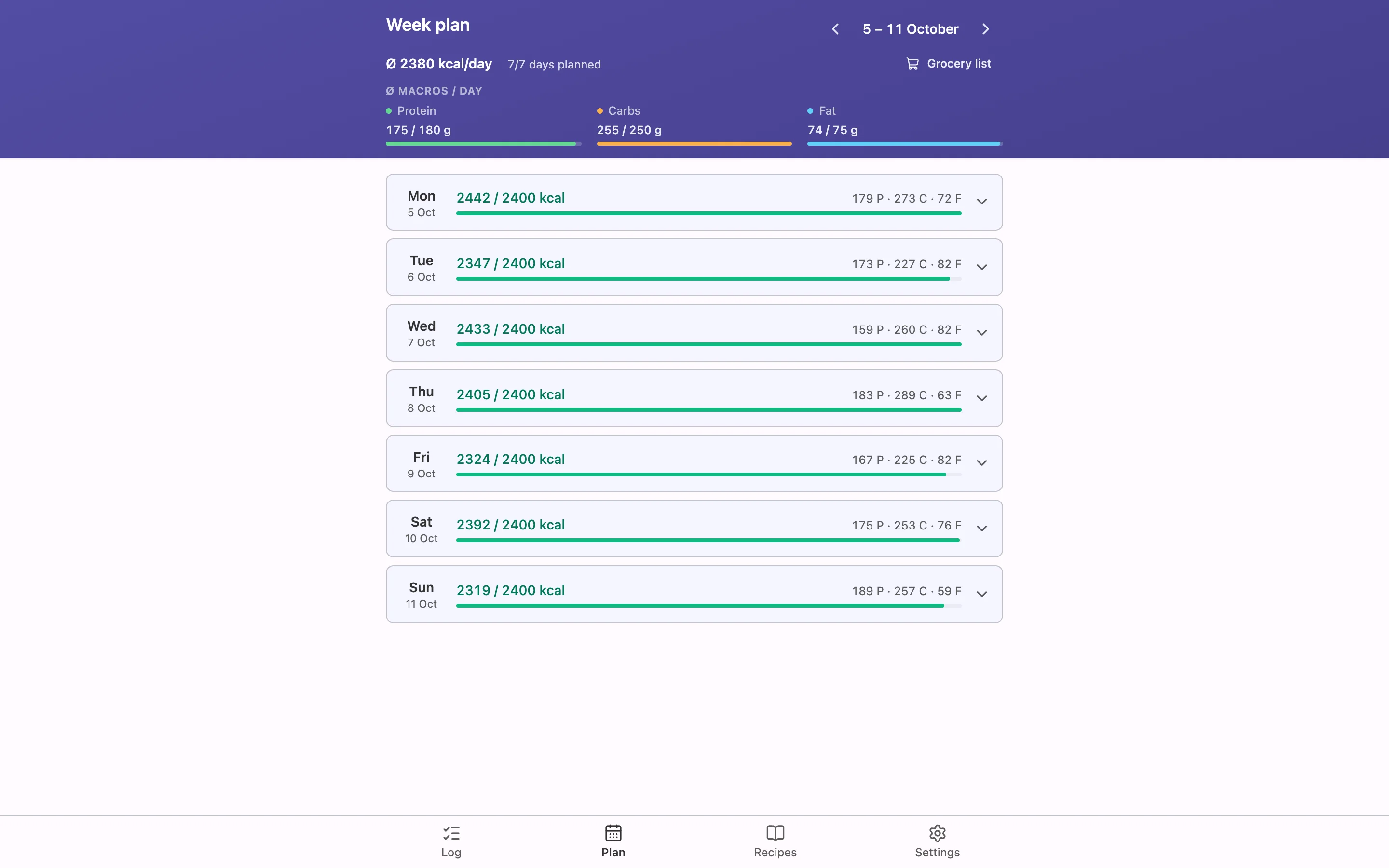
Since I have two little kids, evenings and weekends mostly don't go according to plan, so I track them ad hoc. I try not to be dogmatic. If a day or two go past my macro or calorie goals, I'm fine. The trajectory is what matters to me.
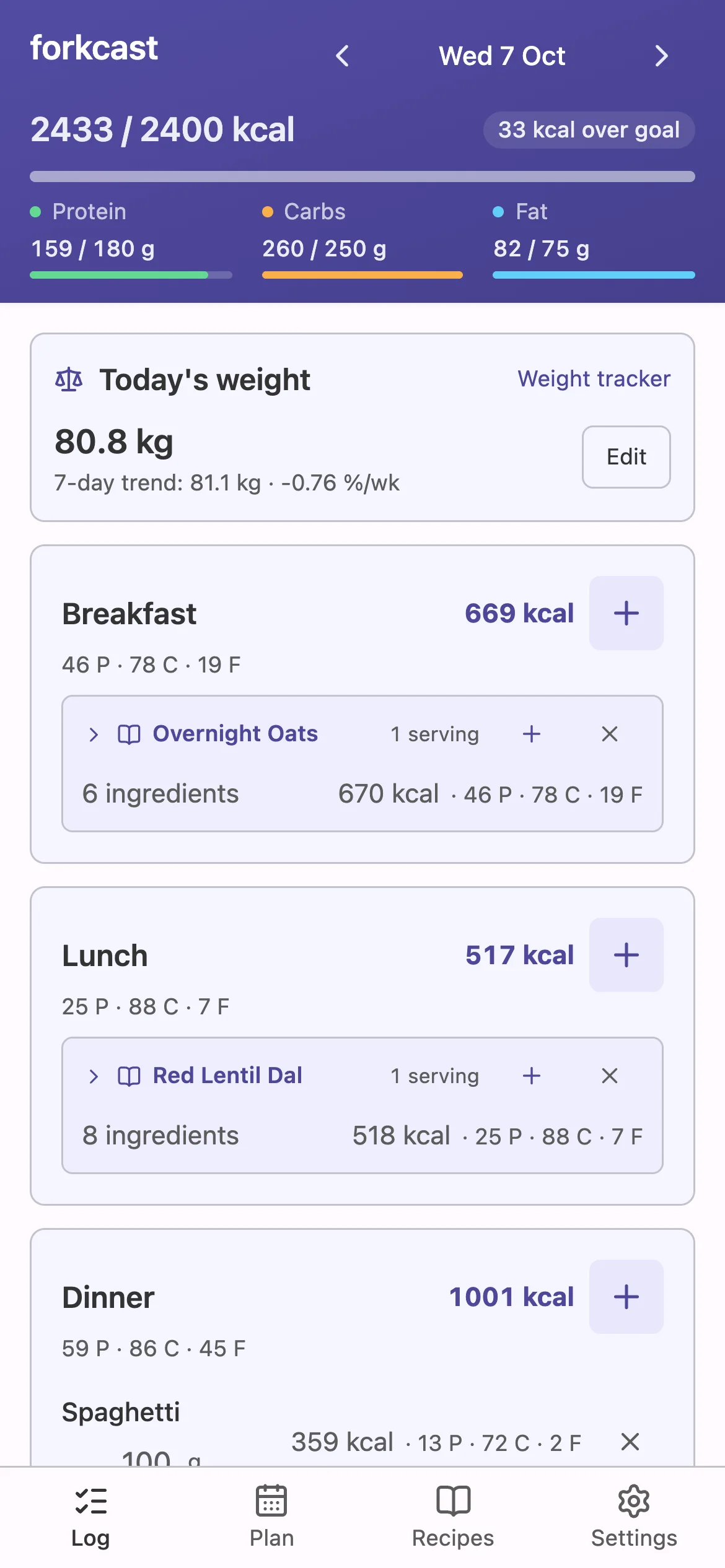
Since groceries are done either by my wife or me, and we were already used to Bring! as a shopping list app, I was very happy to discover that Bring! has a very low-effort way to export a shopping list into it, props to Bring! here. :)
What I noticed during shopping and cooking is that sometimes I don't get the package sizes I'd like, and since I can't freeze all leftovers, I had to change ingredient amounts during cooking sessions here and there. This is why I made it easy to swap ingredients or change amounts during cooking sessions without having to change the recipe. Since this could change the planned week, changing the plan also has to be low-friction.
Red Lentil DalRecipe · 4 servings · unchanged
- Red lentils300 g
- Onion120 g
- Garlic12 g
- Ginger16 g
- Tomato3 medium
- Coconut oil20 ml
- Spinach200 g
- Basmati rice200 g
Spices & odds and ends
- Turmeric1 tsp
- Cumin1 tsp
- Saltto taste
Wed · LunchLogged · 1 serving
- Red lentils100 gwas 75 g
- Onion30 g
- Garlic3 g
- Ginger4 g
- Tomato90 g
- Coconut oil5 ml
- Spinach50 g
- Basmati rice50 g
Turmeric, cumin and salt stay out.
604 kcal · 31 P · 102 C · 7 F

Since this app was born out of a 90-day fitness challenge, easily setting fitness goals and tracking weight is also part of it. I weigh myself each morning to see the trend across the week and month. Calorie goals have been set using the built-in calculator, which uses the Ten Haaf formula. For me, results have been pretty good so far.
What I took from other apps, and where AI comes in
There were things from other apps that I liked tho. Barcode scanning and searching for packaged foods, for example, since this is almost a must-have for ad hoc tracking. Luckily, Open Food Facts offers an open and free API for nutrition info for packaged foods, which can be queried with the barcode or a text search. It has had almost everything I searched for so far. For cases where it did not find anything, I integrated AI-based OCR to extract nutrition info from packages myself and save it into a local catalog.
While Open Food Facts is good for packaged foods, 'generic', non-packaged foods like veggies, eggs or the like come from a local catalog that has been seeded with nutrition info for common stuff. The catalog can be edited through the UI, as this was nice to have sometimes. The catalog can also be used to search for ingredients when adding recipes. Since some ingredients in recipes don't come with weights but with pieces, common piece-to-weight info is also part of the catalog.
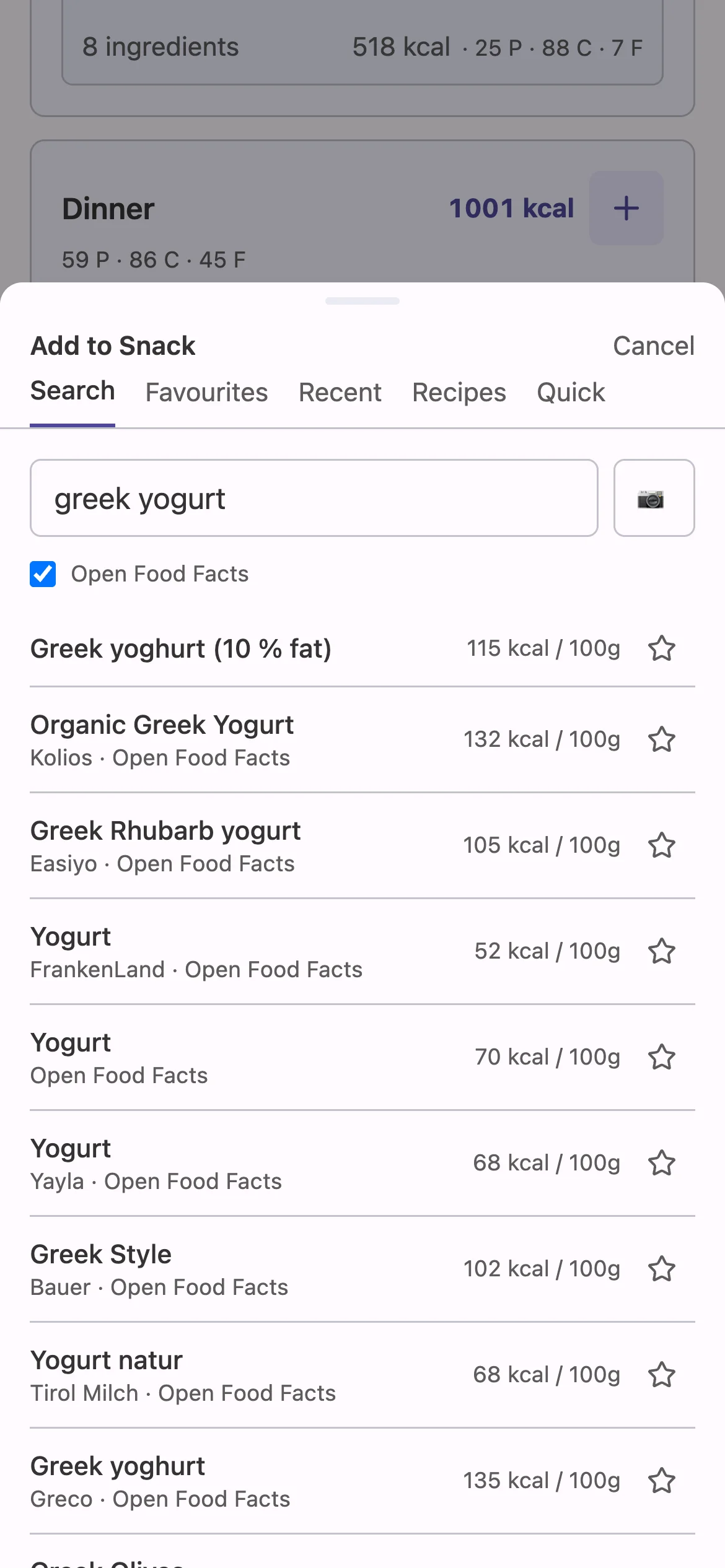
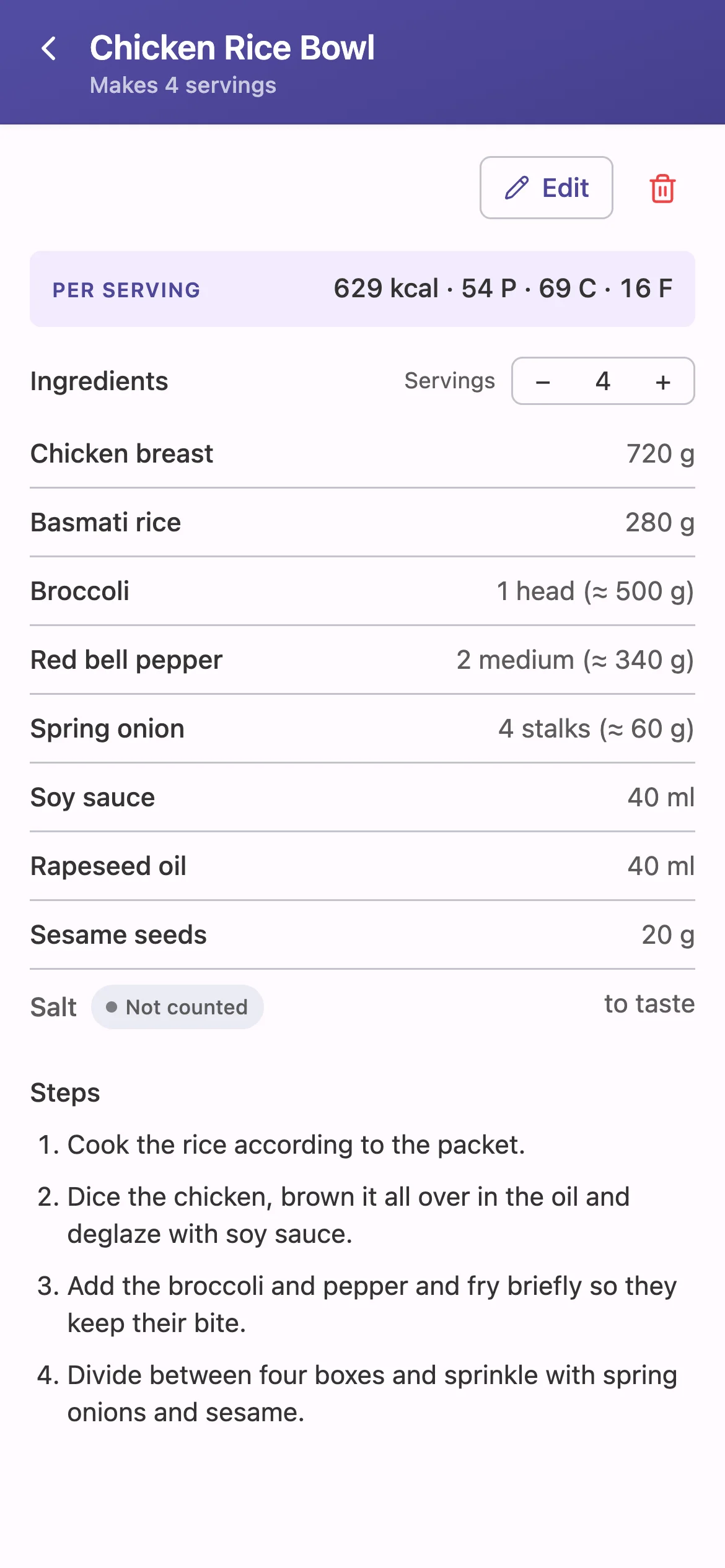
Mentioning AI-based OCR: forkcast is also able to extract recipes from photos or screenshots, which was important for me, since I didn't want to invest the time manually adding recipes I like, which usually come from books or the interwebz.
Since I mentioned AI here: I did not want to include AI-based planning or AI-based recipe generation or whatever here. I want to be in control of what I eat, and I also want to think about it. I sprinkled AI stuff in where I felt it makes sense as support. I use Anthropic models for OCR, recipe extraction and nutrition information retrieval for ingredients that are not in the catalog yet. This only happens if you configure your own Anthropic API key; without one, these features hide themselves. Everything can be adjusted; AI just offers suggestions.
What it can't do
What it can't do right now is cooking. Sure, I love cooking. But sometimes, on a Sunday evening, doing meal prep while the PS5 silently whispers my name, or family... cooking is tough. ;)
Other than that, regarding big features, it feels quite complete for me now. The important nuance here is: for ME. If YOU are about to use it, your mileage may vary, of course.
Since in my family nobody else is interested in calorie tracking, there was no need for making it multi-user, having a more solid database (it's plain JSON files right now) or whatsoever. I wanted to keep maintenance and extension low-effort.
If there is demand for this app to be used by others, things have to change here and there, of course. The core idea and focus won't change tho. If more AI features are being requested, I'd rather offer a proper CLI / MCP than spread it across the UI. I also don't think that I will turn this into a native app; a PWA is fine for me.
Another AI disclaimer: I mentioned family, a full-time job and kids that are still too young to manage themselves autonomously, so this app has been created with a lot of AI help. A lot of review time goes into reviewing specs to make sure it works the way I want. Code and tests are reviewed with my 'good enough' hat on. Since it's open source, if others want to play with the code and make recommendations, contributions are more than welcome.
Why I'm asking
If the demand for this app is there, especially for hosted, I'll come up with a roadmap and a way to stay in the loop for a release. I'll also put my 'production' hat on then and use some of my PS5 time to work on forkcast and make sure it meets the requirements of an app that is used by others. I'd also see if I can make self-hosting easier in any way. I'm generally interested in any feedback, also if it is 'wow, another calorie tracker that nobody needs'.
As stated, if you're interested in how this turns out, leave your mail. I'll write once, and then the email is deleted.
Answer the questionAbout the name
I thought I was very clever and creative with the name 'forkcast'. Since it was only for me, I didn't do any research on whether this name had been taken. Well, it turned out there is not only one product in the calorie tracker and meal planning category with this name. A pity. So the name might be subject to change. Ideas welcome ;)